
Most recruitment agencies do not have a tool problem. They have a seventh tool, bought to fill the gap between the previous six, and a growing suspicion that none of them talk to each other.
This is an honest map of the category. Not a ranking, because the tools below are not competing for the same job, and a ranking would imply they were. What follows is what each type is genuinely built for, who it suits, and the point at which it stops helping.
Flynt is on this list and we built it, so treat our entry accordingly. We have tried to be as blunt about our limits as about everyone else's design decisions.
How to read this list
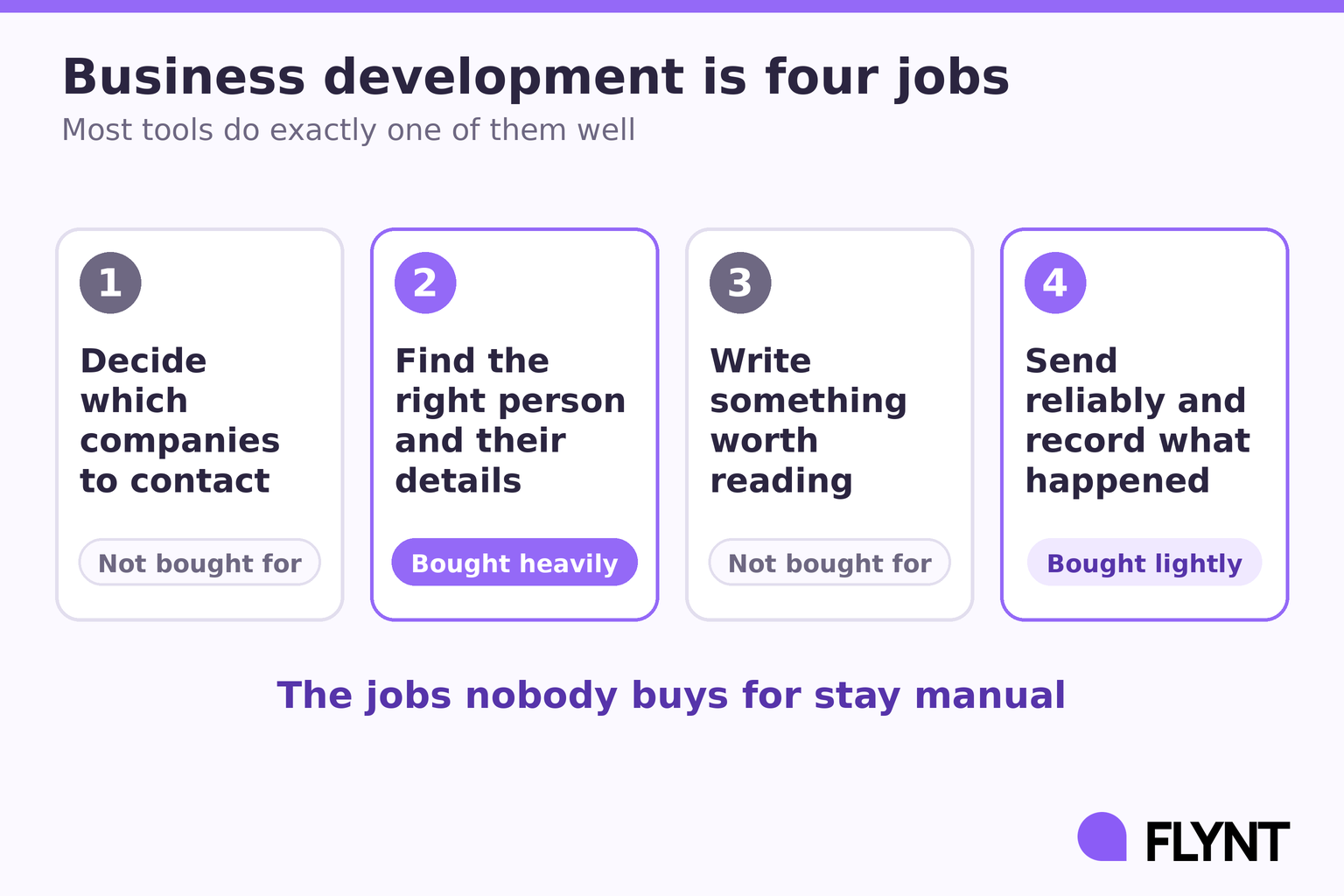
Before the categories, one framing that saves most of the decision. Business development has four distinct jobs inside it, and almost every tool in this market does exactly one of them well.
The first job is deciding which companies to contact. The second is finding the right person and their details. The third is writing something worth reading. The fourth is sending it reliably and recording what happened.
Most agencies buy heavily for job two, lightly for job four, and not at all for jobs one and three, which is why their business development feels like it is mostly admin. The jobs nobody buys for are the jobs that stay manual, and the jobs that stay manual are the ones that stop the week you get busy.
As you read each category, ask which of the four jobs it is solving, and whether that is the job currently blocking your desk.
1. Contact databases
Examples: ZoomInfo, Apollo, Lusha, Cognism.
What they are built for: finding a named person's email and phone number at a company you have already decided to contact. They are very good at this, and at scale. If you can define the account, they will find the people inside it.
Who they suit: agencies with a defined account list who need contact details for people inside those accounts, and anyone whose outreach is account-based rather than opportunity-based. If your plan is to own twenty enterprise clients over five years, this is the correct purchase and you should make it.
Where they stop: a database tells you a company exists and employs engineers. It does not tell you that anything is happening there. Recruitment demand appears and expires, so knowing who to call matters far less than knowing when, and a filter describes a permanent state rather than a current event.
The second problem is structural and gets worse over time. Everyone buys the same database, so the hiring manager whose email you just found has had it found by forty other people this quarter. You are not reaching a prospect, you are joining a queue, and your position in that queue was decided by when you arrived rather than by what you wrote.
This is why reply rates on bought lists decline without anything apparently changing. The data did not degrade. Access stopped being an advantage the moment everybody could buy the same access.
2. Go-to-market builders
Example: Clay.
What they are built for: assembling custom workflows out of data sources, enrichment waterfalls and AI research steps. Genuinely one of the most capable products built in the last five years, and teams with an operations hire build things in it that did not previously exist.
Who they suit: teams with someone who enjoys building, or an actual ops person. If you want to construct something nobody else has, and you have the hours to maintain it, this is where you do it.
Where they stop: it is a canvas, not a system. Everything it does, you have to design first, and then keep designing as data sources change and endpoints move. Most recruitment desks do not have an ops person. They have one person already doing four jobs, and the tool that requires a build phase is the tool that gets abandoned at the configuration screen on a Thursday when a candidate drops out.
The honest version of the trade: flexibility is a gift to a team with time and a tax on a team without one. Which of those you are is the whole decision.
3. Email sequencing tools
Examples: Instantly, Smartlead, lemlist.
What they are built for: sending a lot of cold email reliably, managing inbox rotation, and handling the deliverability mechanics that decide whether anything you write gets read at all.
Who they suit: anyone sending volume who already knows who they are sending to. If your problem is that good messages are not arriving, this category is where the fix lives.
Where they stop: they are the engine, not the driver. They have no opinion about who should be on the list or what the message should say, which means the two hardest parts of recruitment business development stay entirely with you.
Worth knowing what good looks like before you buy one. Average bounce rates run around 5.1% platform-wide, and anything above 2% is actively damaging your sending reputation. Gmail rejects bulk senders above a 0.1% spam complaint rate. Those are the numbers a sequencing tool should help you stay under, and they are the right questions to ask on a demo.
4. LinkedIn automation tools
Examples: HeyReach, Expandi, Dripify.
What they are built for: running connection requests and messages at a pace that does not get the account restricted.
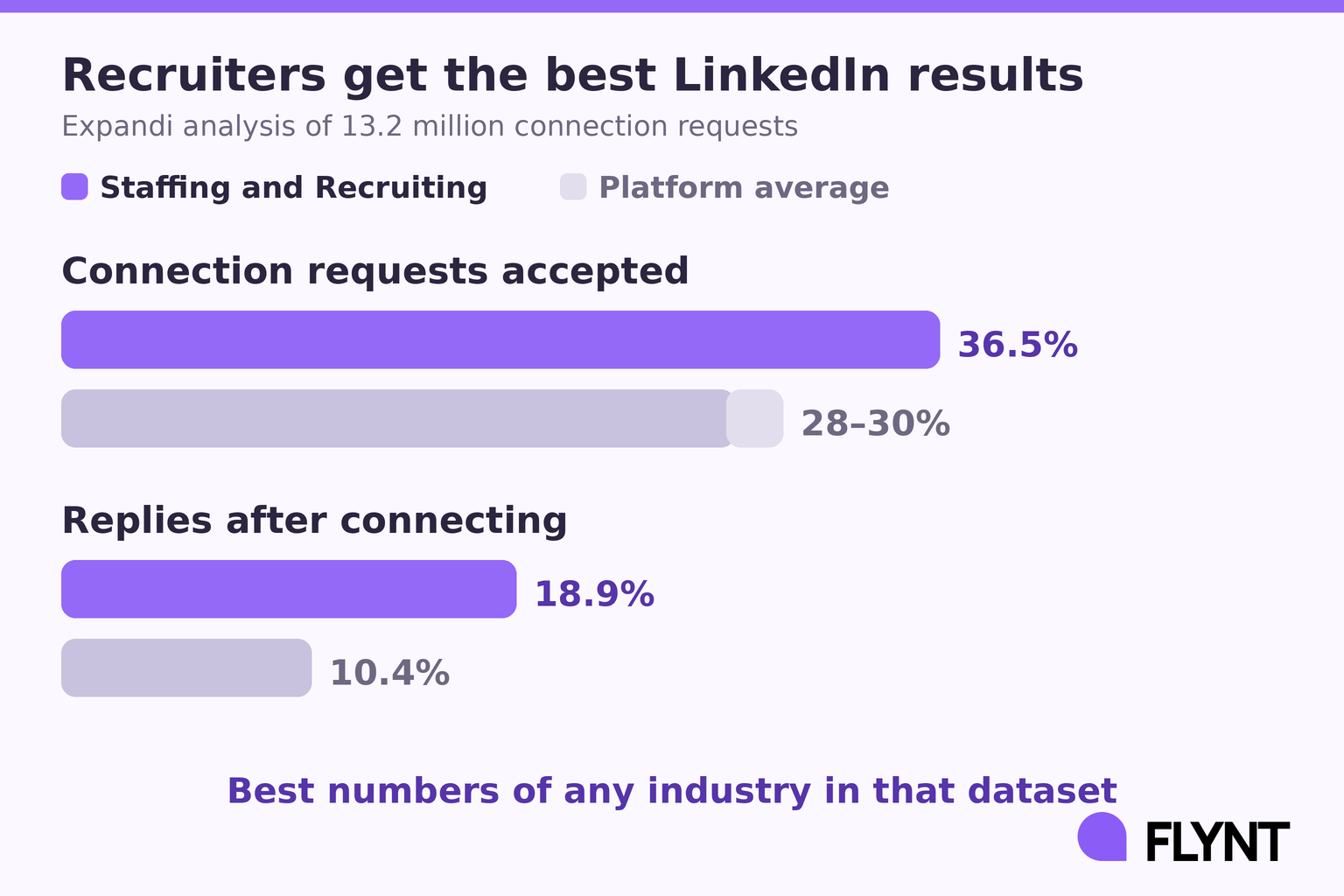
Who they suit: recruiters whose market lives on LinkedIn more than in the inbox, which in some sectors is most of it. And the data says recruiters should care about this more than almost anyone: in Expandi's analysis of 13.2 million connection requests, Staffing and Recruiting achieved a 36.5% acceptance rate against a platform average of 28 to 30%, and an 18.9% reply rate after connecting against a platform average of 10.4%.
Those are the best numbers of any industry in that dataset. People expect to hear from a recruiter, and that expectation is an asset most agencies never spend.
Where they stop: LinkedIn is a precision channel, not a volume one. Around thirty connection requests a day and no more than a hundred across any rolling seven days is the practical ceiling, and that ceiling is per account rather than per campaign. Running three sequences from one profile does not give you three allowances, it spends one allowance three times faster.
Used as a replacement for email it caps your reach permanently. Used alongside it, it is the highest-intent channel you have.
5. Recruitment CRM and ATS
Examples: Bullhorn, Vincere, JobAdder, Loxo.
What they are built for: managing candidates, roles and placements once the work exists.
Who they suit: everyone, eventually. You will own one of these and you should.
Where they stop: an ATS is a system of record, not a system of origination. It tells you what is in your pipeline. It has no view on what should be. This is the single most common confusion in the category, and it is why so many agencies believe they have a business development system when what they have is a very good filing cabinet.
There is a second failure mode worth naming. Every recruitment CRM dies the same death: set up carefully with detailed fields, abandoned within six weeks because keeping it current costs more than forgetting. A CRM should cost less to update than it costs you to forget, and the only reliable way to achieve that is for the updating to be a by-product of doing the work rather than a separate act of discipline at the end of a tiring day.
6. Candidate sourcing platforms
Examples: SeekOut, hireEZ.
What they are built for: finding people, with search over large candidate profile datasets.
Who they suit: agencies whose bottleneck is candidate supply rather than client demand.
Where they stop: they solve the other half of the business. Worth knowing which half you are actually short of before you buy, because most agencies who believe they have a candidate problem have a client problem that is presenting as one. If you had three more clients, would you be able to fill the roles? If yes, your constraint is on the client side and no sourcing tool touches it.
7. Job board aggregators and scrapers
What they are built for: collecting job postings so you can see who is hiring.
Who they suit: anyone working a job-led motion who wants raw volume of hiring signals.
Where they stop: a posting on its own is a name and a job title. You still have to read it, work out who owns the hire, find their contact details, decide whether it is worth writing to, and write something specific. That is roughly twenty minutes a company done properly: three minutes to read the posting, five to work out the angle, five to find the right person, seven to write.
Twenty minutes times thirty companies is ten hours. Which is why scraped lists get worked enthusiastically for a fortnight and then quietly stop, and why the recruiter concludes that the data was bad when the data was fine and the labour was the problem.
8. General AI assistants
Examples: ChatGPT, Claude.
What they are built for: producing good writing from context you supply.
Who they suit: anyone writing a one-off pitch to a company they already care about. For that job they are excellent and cost almost nothing, and anyone telling you otherwise is selling something.
Where they stop: a chat window is a brilliant answer to a question you have already formed. It does not know who to write to, does not know what happened at that company yesterday, does not send anything, does not remember the last message, and does not follow up.
And the quiet one that decides it: a chat window requires a decision every single time you use it. Open it, paste the context, read the output, copy it somewhere, send it. That is fine at company three and does not happen at company forty on a day with two candidate dropouts and a client call.
9. Signal-based BD platforms
Example: Flynt.
What they are built for: watching a defined market, detecting events that create hiring demand, and running the outreach that follows from them. A company posting a role in the last 24 hours, raising a round, or completing an acquisition are all events that make a conversation welcome this week and irrelevant next month.
Who they suit: agencies with a defined market who want business development to happen without someone deciding to do it. The week you land a client and vanish into delivery is the week that decides your next quarter, and it is the week every manual process stops.
Where they stop, honestly: Flynt is not a database. You cannot look up any company in any country on a whim, and we have no plans to become that. If your motion is account-based rather than event-based, a database serves you better. Clay will also beat us on flexibility and it will not be close, because flexibility is the thing we traded away deliberately in exchange for working on day one.
How to actually choose
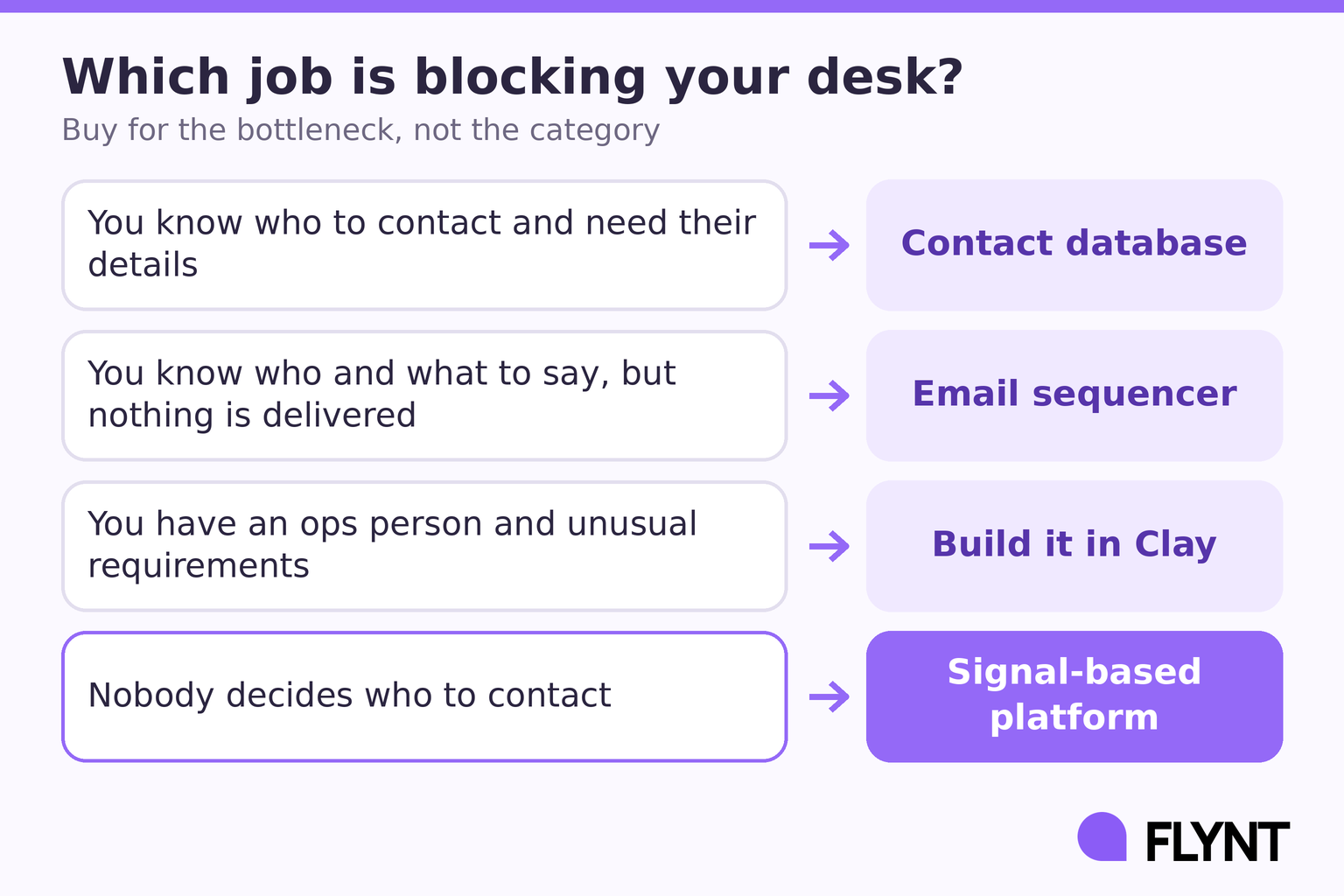
The useful question is not which tool is best. It is which of the four jobs is the bottleneck on your desk right now.
If you already know exactly who to contact and just need their details, buy a database. If you know who to contact and what to say but nothing is getting delivered, buy a sequencer and fix your infrastructure first, because the best-written outreach in the world has a zero percent reply rate from the spam folder.
If you have a capable ops person and unusual requirements, build it in Clay and you will end up with something better fitted than anything off the shelf.
If your problem is that nobody decides who to contact, and business development quietly stops the week you land a client, no amount of contact data fixes that. The missing piece is the deciding, and the deciding is the part that does not need you.
A test before you buy anything
Open whatever list you are working from now. Take the first ten companies. For each one, write a single sentence explaining why a message from you would be welcome this week.
If you can write eight of those sentences without inventing anything, your targeting is working and your constraint is volume, copy or delivery. Buy accordingly.
If you can write one, you do not have a data problem. You have a timing problem that has been presenting as a data problem, and every tool you have bought so far has been aimed at the wrong half of it.
Frequently Asked Questions
What software do recruitment agencies use for business development?
Most use a combination: an ATS for records, a contact database for details, a sequencing tool for sending, and LinkedIn Sales Navigator for research. The cost of that combination is not the subscriptions, it is the manual handoffs between them, which is where most of the week actually goes.
Is a recruitment CRM enough for business development?
No. A CRM records what is already in your pipeline. It has no mechanism for deciding what should enter it. The two jobs are frequently confused because both involve a list of companies.
How many tools does a recruitment agency actually need?
Fewer than most have. The practical minimum is something that originates opportunities, something that sends, and something that records. Where those three live matters less than whether anything falls between them.
What is the best lead generation tool for recruiters?
There is no single answer, because recruiters have different bottlenecks. The honest version: if you cannot name which of the four jobs is blocking you, buying anything is a coin flip.
What is the cheapest way to start doing recruitment BD properly?
Pick one market, work out who in it had something happen this week, and contact thirty-five of them a week consistently. The tooling question only matters once you have tried that by hand and found out which part breaks first.
See what your market looks like. Start a free 7-day trial at tryflynt.ai.